
Running Ubuntu Containers with Hyper-V Isolation on Windows

Dustin Kirkland
on 13 September 2017
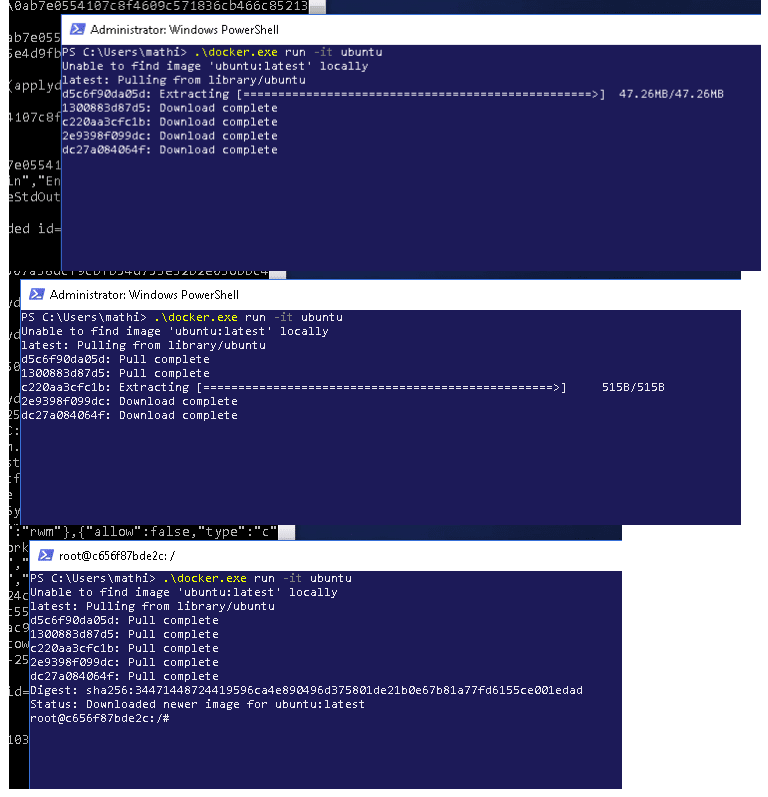
Canonical and Microsoft have teamed up to deliver an truly special experience — running Ubuntu containers with Hyper-V Isolation on Windows 10 and Windows Servers!
We have published a fantastic tutorial at https://ubu.one/UhyperV, with screenshots and easy-to-follow instructions. You should be up and running in minutes!
Follow that tutorial, and you’ll be able to launch Ubuntu containers with Hyper-V isolation by running the following directly from a Windows Powershell:
-
docker run -it ubuntu bash
Cheers!
Dustin
Talk to us today
Interested in running Ubuntu in your organisation?
Newsletter signup
Related posts
Predict, compare, and reduce costs with our S3 cost calculator
Previously I have written about how useful public cloud storage can be when starting a new project without knowing how much data you will need to store. ...
A year of documentation-driven development
For many software teams, documentation is written after features are built and design decisions have already been made. When that happens, questions about how...
Announcing FIPS 140-3 for Ubuntu Core22
FIPS compliance for IoT use cases in Federal space. In this article, we’ll explore what Ubuntu Core is, and how to use it with FIPS.